Robbie The Robot — how to play
Program a robot on a board up to 64×64 cells. Corridors split and rejoin, and each route has its own doors, holes or locks. Larger boards add more puzzles and shortcuts across stages. Arrange movement blocks, loops, conditions and subprograms; the route with the fewest tiles traveled scores highest. Share a seed to give a friend the same puzzle.
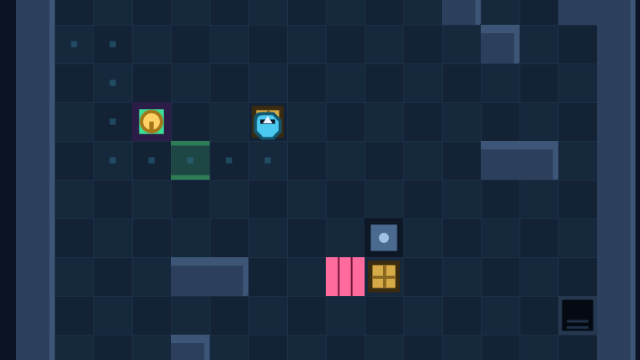
Players: 1. The available modes are selected inside the game.
Objective
Reach the exit by one of several routes. Fewer tiles traveled score more points; fewer ticks break ties.
Rules and controls
- Click "New puzzle". The board, walls, crates, switches, doors, holes and locks all come from a seed — the same seed always builds the identical puzzle.
- Pick a board from 12×12 to 64×64. Larger boards add more puzzles and alternative connections between corridors.
- Lay blocks one under another: move forward and back, turn 90° left or right, grab and drop. Drag a block out of the palette or add it with a single click.
- Use loops: FOR repeats its body a set number of times, WHILE runs while a condition holds, and IF and IF NOT check whether the front is free, whether a wall or a hole blocks the way, whether an item, switch, door or exit is ahead, and whether you are carrying something.
- The Function A, B, C tabs hold subprograms: put blocks there and call them from the main program with the Call block. The same sequence stops costing two blocks.
- Clear the barriers: a door gives way once a crate stands on its plate, a hole is filled with a crate you then drive over like a bridge, and a lock opens with a key the robot carries there.
- A grabbed crate rides above the robot's head, so you only ever set it down in front of you — the game refuses to place it in a wall, a door or an occupied tile.
- Press run and watch the robot carry out your program tick by tick, with animated turns, lifts and set-downs; you can pause it, step it forward one move, or reset at any time.
Your first match
Start with a 12×12 board and find two routes to the exit. Check which items lie before the barriers on each route. Then arrange the movement, turning, grab and drop blocks.
What to watch for
On a larger board, a side corridor may bypass several barriers but require a trip to fetch a key or crate. Compare the tiles the robot actually travels: fewer moves score more, and ticks break ties when routes are equally long.
Practical tips
- Compare routes before writing the program: a nearby corridor may require a harder puzzle, but fewer moves earn more points.
- Save a repeating stretch of the route in function A and call it twice — the block counter only counts the body once.
- Watch the blocked-ahead condition: WHILE with IF NOT keeps going until something stands in the way, so you never waste a tick on a bump.
- You only set a crate down in front of you — plan the turn so it lands on the plate or in the hole without reversing.
- Copy the seed to a friend: they get the identical board and can beat your score.
Read and add reviews · All instructions · Choose another game